lighting
Lighting continuity
Lighting / Capture technique
Definition
Lighting continuity is the practice of making the light in a stop-motion shot repeat frame after frame unless the shot deliberately changes it. It includes lamp position, intensity, colour temperature, exposure, white balance, practical lights, bash/work lights, flags, reflections, and the animator's own access path. In live action a small lighting change may pass as motion; in stop motion it becomes one frame of accidental animation.
Overview
The central point is simple: in stop motion, light is part of the animation system. A puppet may move one millimetre between frames, but if a flag is nudged, a dimmer drifts, a practical light warms up, or the camera auto-adjusts exposure, the viewer sees the lighting jump as if the world itself twitched. Lighting continuity is therefore not only a cinematographer's taste problem. It is a production-control problem shared by camera, lighting, animation, rigging, set construction, and software.
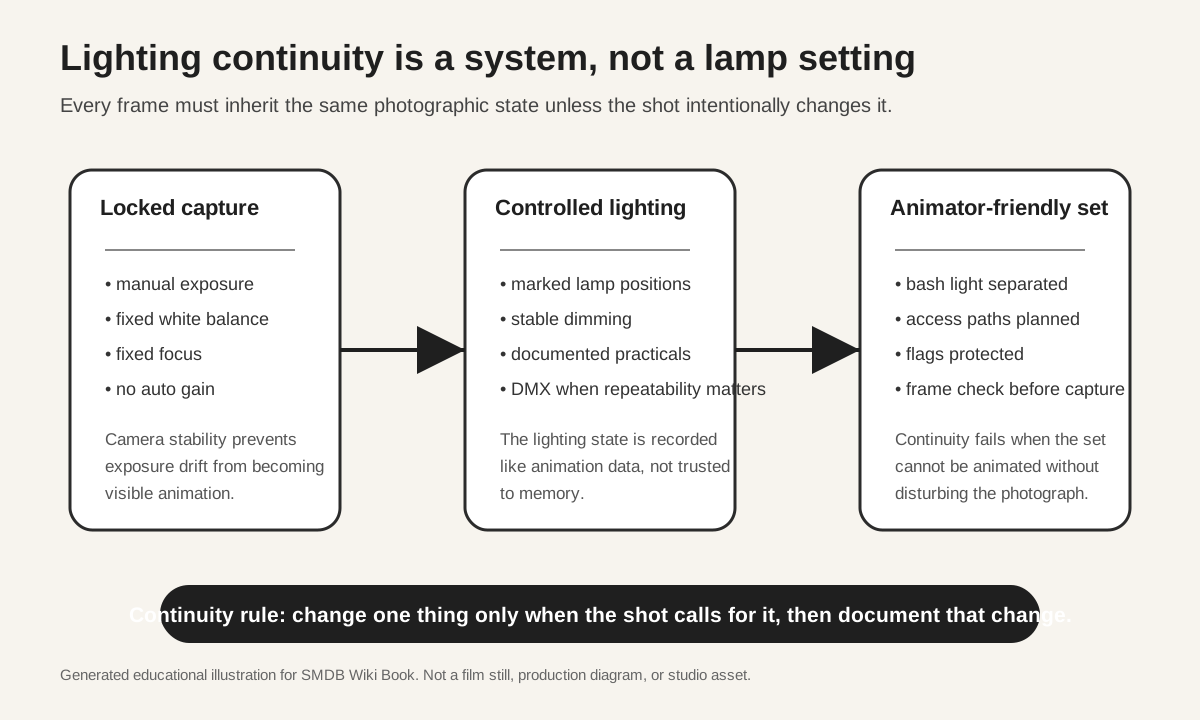
The most common misconception is that continuity means leaving lights alone. That is only the visible end of the discipline. A production-ready setup documents the state of the shot: manual camera exposure, fixed white balance, repeatable focus, marked lamp stands, measured dimmer levels, noted diffusion and flags, a separate work light that can be turned off before capture, and a frame-check habit before every exposure. The useful standard is not "does the lighting look good now?" but "can the same photographic state survive hundreds or thousands of animator touches?"
Dragonframe's lighting hardware makes the idea explicit. The DDMX-512 is built to pair Dragonframe with DMX dimmer or switch packs, letting a stop-motion setup automate work lights, front-light/back-light passes, and keyframe-based lighting programs. Dragonframe's DMC-32 goes further as a motion-control coordinator, combining step/direction motor control, camera triggering, and a DMX512 lighting output. These tools do not replace lighting judgement. They turn repeatability into data so that a lighting cue can be shot, repeated, split into passes, or tied to a motion-control move instead of reconstructed from memory.
Miniature lighting makes continuity harder because the working space is compressed. A flag that would be safely out of reach on a live-action stage may sit inches from an animator's hand. A practical lamp in a miniature window may be physically close to plastic, paint, foam, or clay. A soft source may be so near the set that a small displacement changes the shadow shape. The more tactile and small the world is, the more the lighting plan must account for human access: where the animator's arm enters, where the tie-down tool goes, where replacement faces are swapped, and which pieces of scenery must be removable without changing the photograph.
Good lighting continuity does not make the image static. It gives the production permission to change the light intentionally: a sunrise cue, a lightning strike, a lantern flicker, a moving train shadow, or a multi-pass composite. The difference is authorship. An intentional cue is charted, test-shot, and repeatable. An accidental cue is discovered in playback after the animator has already spent the day performing.
WHY IT MATTERS IN STOP-MOTION: Stop motion magnifies small discontinuities because the audience is already reading frame-to-frame change as motion. A one-frame exposure shift is not background noise; it becomes a visible beat. This is especially damaging in close-ups, slow acting shots, and shallow-focus miniature photography, where the audience is watching subtle facial, hand, or body increments. The better the animation, the more distracting accidental lighting becomes, because the audience can feel that two different systems are fighting: the performer is moving carefully while the photographed world is drifting carelessly.
PRODUCTION CONTEXT: Lighting continuity should be designed before animation begins. On a professional puppet stage, the lighting crew is not just making a pleasing frame. They are building a repeatable machine around the animator. The camera department locks exposure and capture settings; the lighting department controls intensity and colour; the art and set departments protect practicals and removable walls; rigging protects flags and tie-down access; animation verifies the frame before capture. A small independent setup can follow the same logic without expensive hardware: the principle is documentation, manual control, and repeatable physical positions.
KEY PRINCIPLES:
1. Lock the camera before blaming the lights. Auto exposure, auto white balance, auto ISO, automatic lens corrections, or changing live-view behaviour can create flicker that looks like lighting failure.
2. Treat every lamp as part of the shot's data. Record position, height, angle, dimmer level, diffusion, gel, flag, bounce, and whether the lamp is practical, photographic, or only a work light.
3. Separate the bash light from the exposure. The animator needs enough light to work, but that work light must be consistently off, blocked, or automated during capture.
4. Protect the animator's access path. If the animator must reach through a key light, brush against a flag, or remove a set wall every frame, the setup is not yet ready.
5. Prefer repeatable control when the lighting changes on purpose. DMX, motion-control integration, exposure passes, and keyframed lighting are useful because they make an intended change reproducible.
6. Review continuity in motion, not only in still frames. A single frame may look acceptable while playback reveals a pulse, crawl, practical-lamp stutter, or reflection jump.
Workflow
- 1. Block the shot with the animator present. Confirm puppet access, tie-down access, replacement-face access, removable set pieces, and rig positions before the lighting plan is declared finished.
- 2. Lock the camera state. Use manual exposure, manual ISO, fixed white balance, fixed focus plan, and fixed capture settings. Note the camera, lens, aperture, shutter, ISO, and any live-view or capture correction that affects exposure.
- 3. Build the lighting state. Place lamps, practicals, diffusion, flags, bounces, and negative fill. Mark stand positions and photograph or diagram the setup for recovery.
- 4. Decide how the animator sees. If a bash light or work light is required, define whether it is manually switched, DMX-controlled, or blocked from the photographed exposure. Test one frame with the work light on and one with it off so the difference is visible before animation starts.
- 5. Shoot a flicker test. Capture a short locked-off sequence with no puppet movement. Play it back at the intended frame rate. If the image pulses, solve that before performance animation begins.
- 6. If lighting changes, chart it. For a practical flicker, sunrise, lightning cue, or moving-shadow effect, write the frame range and levels. Where possible, store the change in Dragonframe, DMX, or motion-control data rather than relying on hand operation.
- 7. During animation, check before capture. Confirm work light state, flag positions, practicals, reflections, set-wall placement, and exposure. The check should be brief, but it must be a habit.
- 8. After each take or section, review playback for lighting motion. Look for one-frame pops, slow dimmer drift, changing reflections, practical-lamp instability, and shadows from the animator or rig.
- COMMON MISTAKES AND MISCONCEPTIONS:
- - Mistaking pretty lighting for production-safe lighting. A beautiful setup that cannot survive animation is still unfinished.
- - Using practical lights without a continuity plan. Miniature lamps can flicker, warm up, shift colour, leak light, or expose wiring problems once they are photographed frame by frame.
- - Forgetting the animator. The set is not a still-life photograph. It is a workplace where hands, tools, replacement parts, tie-downs, rigs, and reference monitors must coexist with the image.
- - Overusing automation as a substitute for judgement. DMX and motion control are valuable only when the lighting logic is already clear.
- - Checking only the final still. Stop-motion continuity errors are temporal. The truth appears in playback.
- WORKED EXAMPLES:
- - `kubo-and-the-two-strings`: Useful as a reference for ambitious miniature-world cinematography. Public production coverage describes LAIKA's attempt to make an outdoor-feeling stop-motion adventure with practical puppets, sets, CG integration, and water work. Lighting continuity is part of what lets a tabletop-scale world read as cinematic space rather than as a sequence of photographed objects.
- - `guillermo-del-toro-s-pinocchio`: Useful as a reference for the modern feature-film expectation that stop motion can carry dramatic, live-action-like lighting and camera language. The lighting-continuity lesson is not a specific lamp recipe; it is that a feature-scale puppet film requires the same continuity discipline as cinematography while adding frame-by-frame physical handling.
- - `memoir-of-a-snail`: Useful as a contemporary clay/puppet feature reference where surface texture, close-ups, and emotionally restrained performance make continuity errors especially visible. Clay and tactile surfaces catch small highlights, so stable lighting protects the material quality of the performance.
- - `wallace-gromit-vengeance-most-fowl` and `chicken-run-dawn-of-the-nugget`: Useful Aardman-related references for clay readability, practical set comedy, and controlled miniature staging. Clay surfaces and comic blocking need lighting that preserves shape without making every animator touch or set adjustment visible.
- RELATED CONCEPTS / INTERNAL LINKS: `lighting`; `miniature-cinematography`; `dragonframe`; `motion-control`; `capture-technique`; `puppet`; `tie-down`; `rig-removal`; `compositing`; `practical-light`; `miniature-set`.
- SOURCE NOTES: Dragonframe product pages are primary technical sources for the DDMX-512 and DMC-32 capabilities, including DMX512 lighting channels, automated work-light/front-light/back-light passes, camera triggering, and motion-control integration. They are official tool sources, so claims should be limited to product capability and corroborated with practical production judgement rather than treated as neutral pedagogy. USITT/DMX512 material is used only to ground the lighting-control protocol background. ASC, WIRED, and other production/trade sources should be used to deepen individual worked examples before this draft is integrated into `concepts_directory.csv`. No copyrighted stills, posters, logos, or production screenshots are used in this draft.
- NEXT ACTION: Before CSV integration, verify each worked example against a stronger production-specific source, ideally cinematographer interviews, official BTS videos, or production design/lighting notes. Add exact video timestamps where a lighting setup, bash-light workflow, DMX cue, or pass-based miniature lighting workflow is visible.
Worked examples
- Kubo and the Two Strings
- guillermo-del-toro-s-pinocchio
- Memoir of a Snail
- Wallace & Gromit: Vengeance Most Fowl
- Chicken Run: Dawn of the Nugget